The Art of Inventory Control: Managing Multi-Location Stocks and Supply Chain Resilience
Inventory is the lifeblood of retail, wholesale, pharmacy, and manufacturing businesses. Yet, it is also one of the most common sources of financial leaks. A business that fails to master inventory control is constantly caught in a destructive cycle: either they have too much capital tied up in slow-moving "dead stock" that takes up valuable warehouse space, or they experience frequent stockouts, leaving customers disappointed and driving them directly to competitors.
For businesses operating across multiple locations—whether that means two retail outlets and a central warehouse, or a nationwide network of branches—the complexity multiplies exponentially.
1. The Core Dilemma: Working Capital vs. Stockouts
Every business owner faces a delicate balancing act. Stocking too much inventory ties up precious working capital, increases storage fees, raises insurance premiums, and exposes the business to risks of damage, shrinkage, and obsolescence. Conversely, stocking too little leads to immediate lost sales, damaged brand reputation, and lost lifetime customer value.
Effective inventory control is not just about counting boxes; it is about optimizing cash flow. The goal is to maximize inventory turnover—the speed at which stock is purchased, sold, and replaced—to ensure that every dollar invested in inventory generates maximum return.
2. Real-Time Multi-Location Visibility: Banishing the Blind Spots
In a multi-branch business, decisions are often made in the dark. Branch A runs out of a high-demand item and places an emergency purchase order with a supplier. Meanwhile, Branch B has ten boxes of that exact item gathering dust in their backroom.
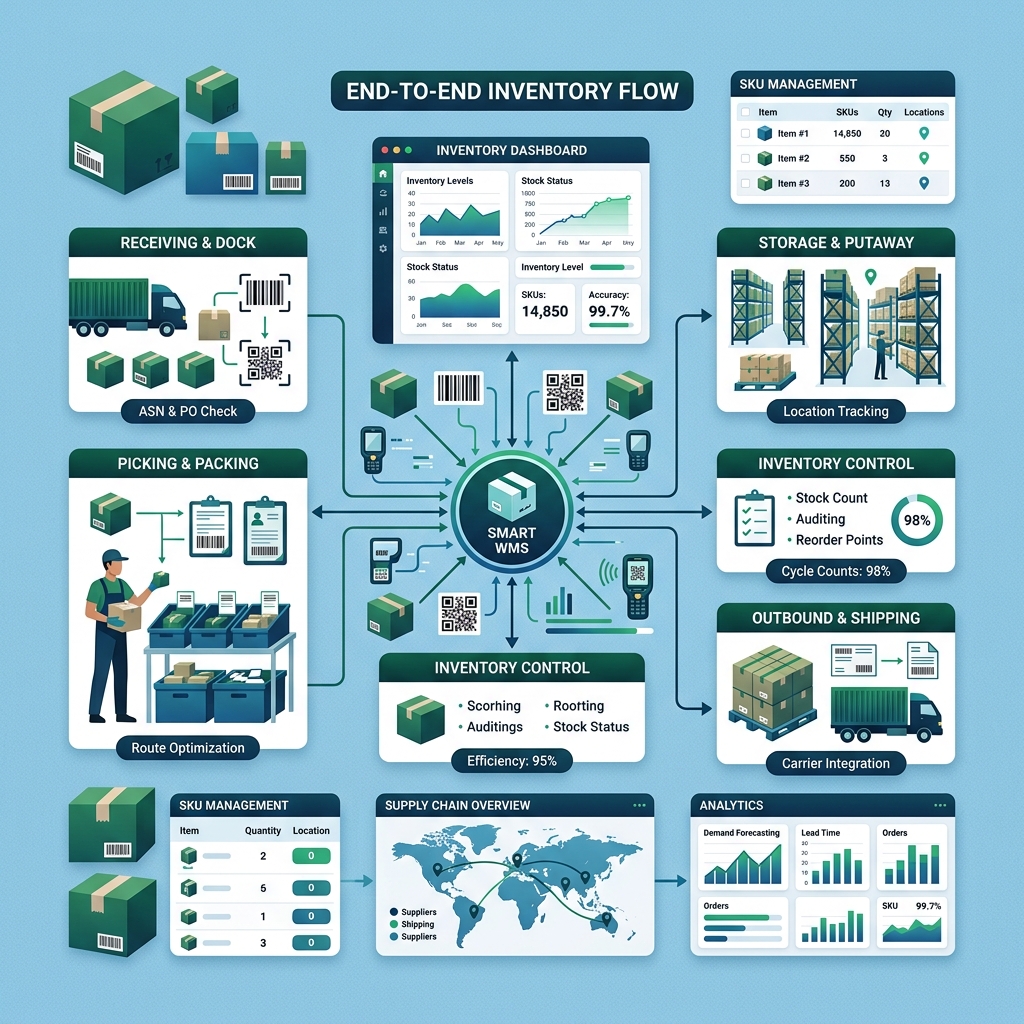
Unified Stock Ledger A modern inventory management system provides a single, real-time view of inventory levels across all physical stores, warehouses, and transit vans. Staff at any location can instantly look up if a product is available elsewhere before placing new orders or turning a customer away.
Intelligent Virtual Warehousing By grouping physical spaces into virtual bins, you can track not just what building an item is in, but exactly which shelf, row, or aisle it occupies. This reduces picking times for orders, minimizes confusion, and eliminates the risk of items being forgotten in storage corners.
3. Automated Reorder Points & Safety Stock: Preventing the Stockouts
Relying on staff to notice when stock is low is a recipe for operational failure. By the time someone notices a shelf is empty, the business has already lost sales.
Dynamic Reorder Thresholds The inventory system calculates the rate of sales and supplier lead times to establish optimal reorder points. When stock levels fall below the threshold, the system automatically triggers a draft purchase order for the replenishment quantity.
Safety Stock Calculations The system automatically factors in variations in demand and supplier delays to calculate a "safety stock" buffer. This ensures you can survive sudden demand spikes or transport delays without interrupting customer fulfillment.
4. Coordinated Inter-Branch Transfers: Balancing Stock Intelligently
Before spending cash to buy more inventory from suppliers, a business should optimize the stock it already owns.
Internal Transfer Workflows When Branch A needs stock, the system generates an internal transfer request to Branch B. Management reviews and approves the transfer, generating picking lists and transit manifests automatically.
In-Transit Tracking Items marked for transfer are placed in a temporary "in-transit" status. This prevents them from appearing available at the sending location while ensuring they are accounted for on the corporate balance sheet until they are officially scanned and received at the destination location, preventing shrinkage.
5. Supplier Relationship Management & Purchase Order Automation
Managing purchases manually via emails, spreadsheets, and phone calls is slow, unorganized, and open to billing errors.
Automated PO Generation Once reorder alerts are triggered, the system aggregates all replenishment needs by supplier, generating clean, professional purchase orders with pre-negotiated pricing and tax rules.
Lead Time Tracking and Scorecards The system tracks the time between placing a purchase order and receiving the physical goods. This reveals which suppliers are reliable and which consistently miss delivery windows (On-Time In-Full - OTIF rate), helping you adjust your ordering schedules to compensate.
6. Batch and Expiry Date Tracking: Eliminating Spoilage and Shrinkage
For businesses selling food, cosmetics, pharmaceuticals, or chemical products, expiry date management is critical to protecting margins.
FIFO/FEFO Enforcement The system enforces First-In, First-Out (FIFO) or First-Expired, First-Out (FEFO) picking rules. Warehouse staff are instructed to pick items that expire first, reducing waste.
Automatic Expiry Alerts A daily dashboard highlights items approaching their expiration dates (e.g., 30, 60, or 90 days out). This allows the marketing team to run targeted promotions to clear the stock before it becomes unsellable.
7. Cycle Counting vs. Full Wall-To-Wall Audits
Traditional inventory audits require shutting down operations for days of manual counting. This causes business interruption and lost sales.
Cycle Counting Workflows A modern system enables cycle counting—periodic, targeted audits of specific categories or locations throughout the year. Instead of counting the whole warehouse at once, staff count a few items every day, correcting discrepancies in real-time.
ABC Inventory Classification Using the Pareto Principle (80/20 rule), the system automatically classifies inventory into three categories:
- Class A: High-value items that make up the bulk of sales value. These are audited frequently (e.g., monthly).
- Class B: Moderate-value items audited quarterly.
- Class C: Low-value items audited semi-annually or annually.
Mobile Barcode Scanning Staff use mobile apps and barcode scanners to scan items during cycle counts. This eliminates manual data entry errors, syncs directly with the central database, and updates stock counts instantly.
Before vs. After: The Impact on Daily Operations
Without Digital Inventory Management:
- Stock audits require shutting down operations for days of manual counting, often revealing massive discrepancies too late.
- Managers spend hours comparing spreadsheets to decide what to order from suppliers, leading to double-ordering or stockouts.
- Internal stock transfers are done informally, leading to lost items, undocumented stock movements, and employee disputes.
- Expired products are discovered on shelves, leading to compliance fines and customer complaints.
- Dead stock builds up in warehouse corners, tying up cash and reducing floor space.
With Inzora Business Suite's Inventory Module:
- Audits are done continuously using mobile barcode scanners without interrupting daily business.
- Reorder points are automated, generating purchase order drafts instantly when thresholds are met.
- Inter-branch transfers are fully documented with audit trails and in-transit tracking.
- Expiry dashboards flag aging stock months in advance, allowing for protective pricing strategies.
- ABC classification and real-time turnover analytics keep dead stock to an absolute minimum.
Selecting the Right System: The Supply Chain Criteria
When choosing an inventory platform, look for robust barcode integration. The system must support mobile scanning apps, allowing staff to scan barcodes to receive stock, perform audits, and pack orders.
Comprehensive Audit Trails are also essential. Every single stock movement—sales, returns, transfers, adjustments, or write-offs—must register who performed the action, when, and why. This enforces accountability and dramatically reduces internal theft.
Inzora Business Suite's Inventory Module is designed to provide these capabilities—delivering real-time control, optimizing working capital, and building a resilient supply chain for your business.